Previous page
Next page
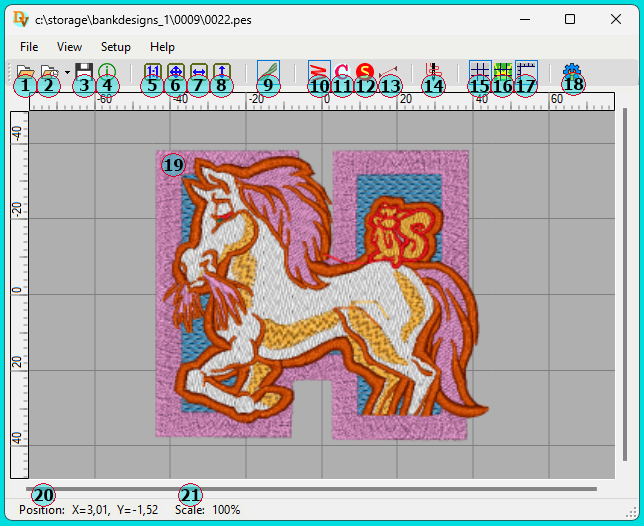
 - Opening a New Design File
 - Reopening a Previously Opened File
 - Saving the Design File Under a Different Name and/or Format
 - Display Design Properties, Including Embroidery Run Time
 - Display the Design at Actual Size (If the Screen Is Properly Calibrated)
 - Fit the entire Image into the program's Workspace
 - Fit the Image Horizontally Within the Program Workspace
 - Fit the Image Vertically Within the Program Workspace
 - Toggle: Display Design as Simple Lines or 3D Threads
 - Toggle: Show or Hide Lines and 3D Threads
 - Toggle: Show or Hide Thread Color Change Points
 - Toggle: Show or Hide Thread Trim Stop Points
 - Toggle: Show or Hide Needle Jumps After Thread Trims
 - Switch to Embroidery Emulation Mode
 - Toggle: Show or Hide the Program Workspace Grid
 - Toggle: Display the Grid Above or Below the Design
 - Toggle: Show or Hide Measurement Rulers
 - Setting Properties for Rendering the Current Design
 - The Design Itself
 - Cursor Position Coordinates
 - Design Scale on Screen
 Version 2.1 from June 12, 2025
Copyright © Sloyk 2025